
Fallback Settings for Full Groups
When all groups in your redirector are full, you don’t have to lose the lead. Grupos Inteligentes allows you to configure fallback pages to keep your sales funnel active.
What is Fallback?
Fallback is the “Plan B” for your redirector. When a lead accesses your link and there are no more available slots in any group, the system can:
- Display a custom message to explain what’s happening
- Redirect to an alternative page of your choice
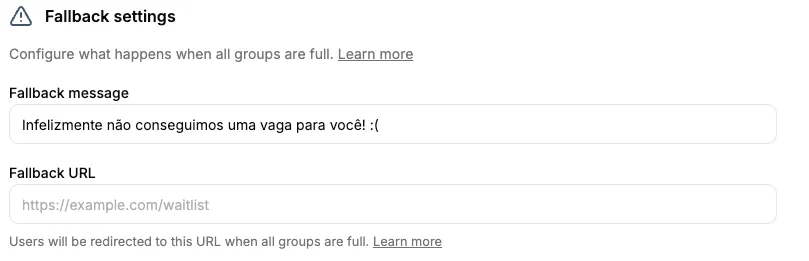
Full Group Message
This is the text shown on the user’s screen when there are no more available slots in any group.
- What to enter: An informative message that offers alternatives
- Examples:
- “All groups are currently full. Join our waitlist!”
- “Oops! Group full. Click here to be notified when a spot opens.”
- “No slots available. Please try again in a few minutes.”
- Limit: Up to 64 characters
- When it’s useful: Keeps the user informed and avoids frustration
- About this field: This message ALWAYS appears when groups are full. If you don’t write anything, a default system message is shown automatically.
Fallback URL
This is the address where the user will be automatically redirected when all groups are full.
- Use for:
- Waitlist page
- Registration form
- WhatsApp direct link
- Product page
- Any other backup page you want
- Format: Must be a valid URL (must start with http:// or https://)
- Limit: Up to 2048 characters
- Important: For the redirect to work, this field MUST be filled in. If left blank, the user will only see the message above but will NOT be sent to any page.
Practical Example
You’re running a big launch:
- Configure your waitlist page URL in the fallback field
- Set up a friendly message informing that groups are full
- When a group fills up, the lead is automatically sent to your waitlist page
- You don’t lose the lead even when there are no available slots in groups
How to Configure Fallback
- Access the Redirectors menu.
- Click the View button on the desired redirector.
- Click the Settings tab.
- Scroll to the Fallback section.
- Fill in the fields:
- Full group message
- Fallback URL
- Click Save changes.
Benefits of Fallback
- Never lose a lead: Even when all groups are full, you can collect information or offer alternatives
- Full control: You decide where the lead should go
- Flexibility: You can change the fallback URL at any time
- Better experience: The user doesn’t see an error page, but a useful one
Usage Tips
- Create a professional waitlist page to capture leads when there are no slots
- Use a direct WhatsApp link as fallback for immediate attention
- Combine with trackers to measure how many leads are captured through fallback
- Monitor how often fallback is triggered to plan for more groups
Next Steps
- Configure your trackers to follow leads arriving through fallback
- Set up the distribution mode to optimize group filling
- Configure the user limit to control group occupancy
- Add more groups to your redirector