
Quick Start Checklist: Set Up in 5 Minutes
This checklist is the most direct way to get your first redirector working. Follow the steps in order.
First access: welcome wizard
Section titled “First access: welcome wizard”When your account does not have any groups yet and you have not dismissed the wizard, it may appear to guide you. The flow has four steps:
- Create your first redirector — Set its name and URL.
- Add your first groups — Paste your WhatsApp links.
- Copy and test your link — Get your link ready to share.
- Add a card or do it later — You can add a card now or choose to do it later.
If you close or skip the wizard, follow the manual checklist below.
5-minute checklist
Section titled “5-minute checklist”Estimated time: 5 minutes
✅ 1. Access and create your account (1 minute)
Section titled “✅ 1. Access and create your account (1 minute)”- Go to https://app.gruposinteligentes.com.
- Click New account.
- Sign up with email or with your Google or Facebook account.
- For email sign-up, enter your name, email, phone number, password, and password confirmation.
✅ 2. Create your redirector (1 minute)
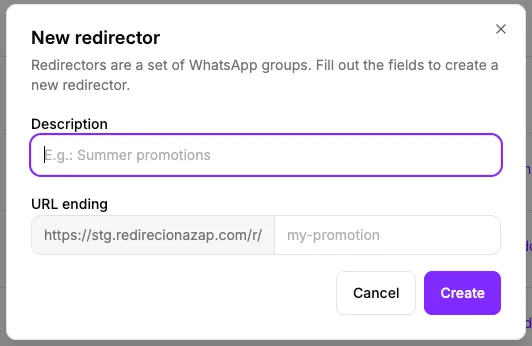
Section titled “✅ 2. Create your redirector (1 minute)”- In the dashboard, click Redirectors.
- Click New redirector.
- Enter a description, such as “My first launch”.
- Set the end of the URL, such as “first”.
- Click Create.
✅ 3. Add a group (2 minutes)
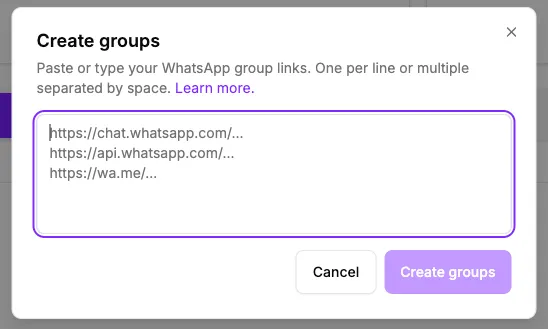
Section titled “✅ 3. Add a group (2 minutes)”- On the redirector you created, click View.
- Copy a WhatsApp group invite link.
- Paste it in the Group link field.
- Give the group a name.
- Enter filled slots, if you want.
- Click Create.
- Repeat for other groups if needed.
✅ 4. Copy and test your link (30 seconds)
Section titled “✅ 4. Copy and test your link (30 seconds)”- Copy your new public link, such as
https://redirecionazap.com/r/first. - Open it in a new tab.
- Check that it opens WhatsApp to join the group.
Next steps
Section titled “Next steps”- Add more groups: see how to manage groups.
- Choose how to distribute people: configure distribution mode.
- Track results: understand click reports.
- Add trackers: configure pixel and analytics.
Quick tips
Section titled “Quick tips”- Start simple: one group is enough to start; add others when you need them.
- Use the same public link: you can keep sharing the redirector link while you adjust your groups.
- Check your plan limits: some plans may limit the number of redirectors available.
Problems?
Section titled “Problems?”If something does not work as expected:
- Check that the WhatsApp link is correct and active.
- Check the number of filled slots entered for the group.
- Contact support by email: suporte@gruposinteligentes.com.
Quick login with Google or Facebook
Section titled “Quick login with Google or Facebook”Do not want another password? Use your Google or Facebook account to sign in. Learn how in Login with Google and Facebook.