
Quick Start Checklist: Set Up in 5 Minutes
This checklist is the most direct way to get your first redirector working. Follow these steps in order.
First Access: Welcome Wizard
The first time you access Grupos Inteligentes (with no groups registered), a guided wizard appears automatically to walk you through the first 3 steps:
- Create your first redirector — Set name and URL
- Add your first groups — Paste WhatsApp links
- Copy and test your link — Ready to share
If you closed or skipped the wizard, don’t worry: just follow the manual checklist below.
5-Minute Checklist
Estimated time: 5 minutes
1. Access and Create Your Account (1 minute)
- Access https://app.gruposinteligentes.com
- Click “New account”
- Sign up with email or with your Facebook account
- Fill in name, email, phone, and CPF (Brazilian tax ID) if using email
- Confirm your email
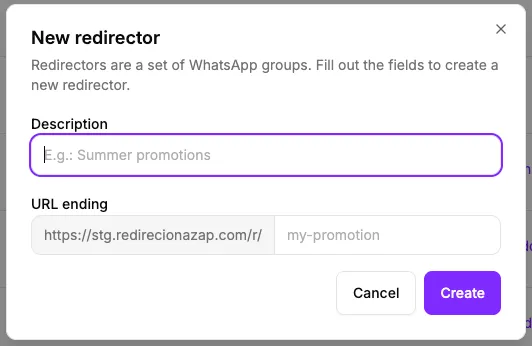
2. Create Your Redirector (1 minute)
- On the Dashboard, click “Redirectors”
- Click “New redirector”
- Description: (e.g., “My First Launch”)
- URL suffix: (e.g., “first”)
- Click “Create”
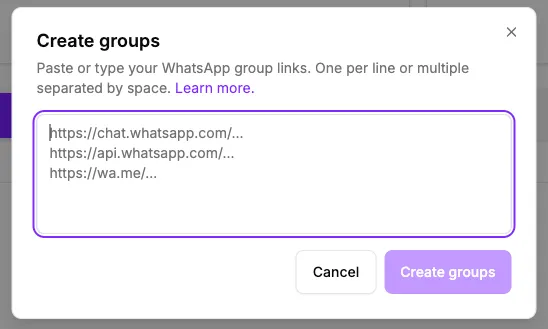
3. Add a Group (2 minutes)
- On the redirector you created, click “View”
- Copy a WhatsApp group invite link
- Paste it into the “Group link” field
- Give the group a name
- Enter filled slots (optional)
- Click “Create”
- Repeat for more groups if needed
4. Copy and Test Your Link (30 seconds)
- Copy your new public link (e.g., https://redirecionazap.com/r/first)
- Open it in a new tab
- Confirm it opens WhatsApp so you can join the group
5. Start Using (30 seconds)
- Paste your link into an ad, email, or post
- Monitor how many people click in the Dashboard
You’re Up and Working!
Your WhatsApp lead distribution system is active. Now you can:
What to do next:
- Add more groups: See how to manage groups
- Choose how to distribute leads: Configure distribution mode
- Track results: Understand click reports
- Add trackers: Configure pixel and analytics
Quick Tips
- More groups = More capacity: Add as many groups as you want without limits
- Consistent reference: You never need to update your promotion link, no matter how many groups fill up
- Start simple: One group is all you need to start - you can add more later
Problems?
If something didn’t work as expected:
- Verify that the WhatsApp link is correct and active
- Make sure you entered the correct number of filled slots
- Our support team is ready to help
Your Smart Link Is Ready
Start promoting it today and see the results. Your groups will fill up automatically, without you needing separate links for each stage.